- Welcome to VGMaps.

Recent posts
#1
Mapping Tips/Guides / Re: What map-making feature wo...
Last post by ReyVGM - Yesterday at 10:21:59 PMQuote from: mechaskrom on November 03, 2026, 10:40:46 AMAwesome! It's exciting to see more emulators with script support.
I tried porting some of my scripts and most seemed to work fine. Some things are missing, such as the ability to specify a file path in emu.screenshot() and functions for toggling layers on or off, but it's a good start.
I'll definitely keep an eye on this emulator and maybe make some feature requests via its github.
Please request that on the github soon. The author is pretty quick to add stuff like that.
#2
Mapping Tips/Guides / Re: What map-making feature wo...
Last post by mechaskrom - November 03, 2026, 10:40:46 AMAwesome! It's exciting to see more emulators with script support.
I tried porting some of my scripts and most seemed to work fine. Some things are missing, such as the ability to specify a file path in emu.screenshot() and functions for toggling layers on or off, but it's a good start.
I'll definitely keep an eye on this emulator and maybe make some feature requests via its github.
I tried porting some of my scripts and most seemed to work fine. Some things are missing, such as the ability to specify a file path in emu.screenshot() and functions for toggling layers on or off, but it's a good start.
I'll definitely keep an eye on this emulator and maybe make some feature requests via its github.
#3
Mapping Tips/Guides / Re: What map-making feature wo...
Last post by ReyVGM - November 02, 2026, 11:26:49 AMQuote from: mechaskrom on October 21, 2026, 10:33:52 AMLUA
Hey, SuperSNES9x is released and it has LUA scripting now. So if you can, write that script you mentioned

https://github.com/shanytc/snes9x/releases/tag/1.63.32
#4
Map Requests / Re: List of unmapped NES games
Last post by JonLeung - November 01, 2026, 12:10:53 AMFinished this image right before midnight on Halloween... talk about a busy day... of doing VGMaps.com stuff instead of Halloween stuff...
Anyway, we had 101 games before, but zagato's submission of five more games - Castelian, The Chessmaster, Paperboy, Roundball: 2-On-2 Challenge, and Stinger - now put us clearly under 100 - with 96 now left to go!
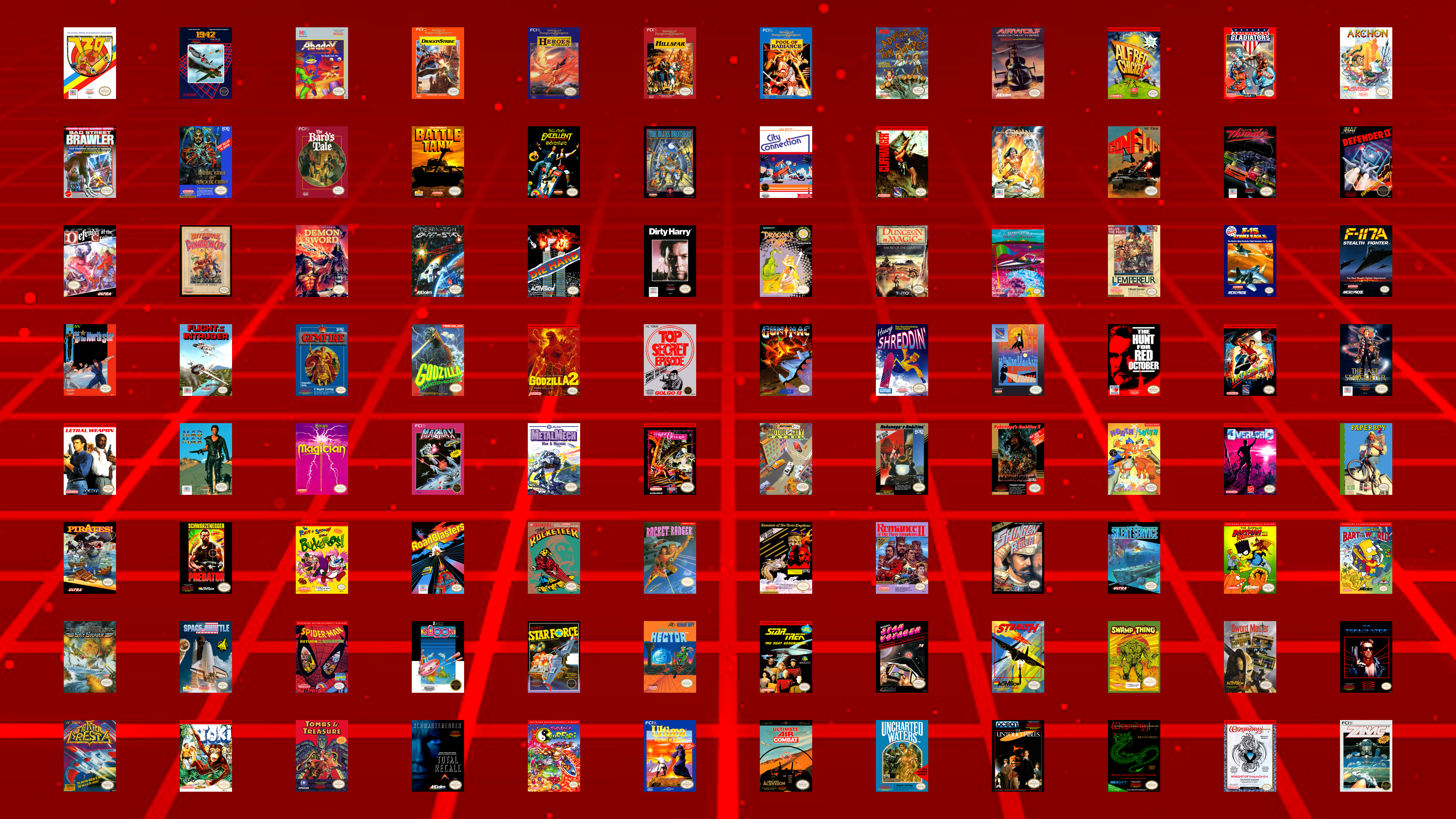
Anyway, we had 101 games before, but zagato's submission of five more games - Castelian, The Chessmaster, Paperboy, Roundball: 2-On-2 Challenge, and Stinger - now put us clearly under 100 - with 96 now left to go!
#5
Maps Of The Month / 2026/11: Pocky & Rocky 2 (Sup...
Last post by JonLeung - October 31, 2026, 09:45:26 PM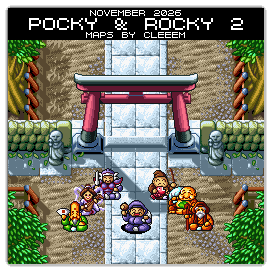
For this month's "Maps Of The Month" featurette, I wish to draw your attention to Cleeem's Pocky & Rocky 2 (Super NES) maps.
Princess Luna, from the moon, is visiting to enjoy the harvest celebrations. But the evil demon, Dynagon, who had earlier been rebuffed by her, sends his servant, Impy, to kidnap the princess, as Dynagon plans to force the princess to marry him. The shrine maiden, Pocky, witnesses the kidnapping, and the seven wise people task her with rescuing Princess Luna. They also tell her to take a friend - so, as before, Rocky accompanies Pocky in this adventure, but Little Ninja and Bomber Bob come along, too, and soon, other partners will join. Can our heroes save the day?
There are nine stages of shooting action, from Pocky's Practice Stage all the way to Demon Castle, all mapped here. Cleeem has taken the effort to indicate where new allies can be found, and what actions to take to uncover secrets. It's easy to want to say "I play Rocky!", but you may have to utilize certain partners to find particular items. The co-op in this sequel is a bit asymmetric, especially compared to the parity between Pocky and Rocky in the previous game, but visually, who doesn't enjoy the look of a cute Japanese 16-bit game?
So to recognize the effort put into mapping this cute shooter, Cleeem's Pocky & Rocky 2 (Super NES) maps will be known as VGMaps.com's Maps Of The Month for November 2026.
#6
Map Requests / Re: JonLeung's Requests
Last post by JonLeung - October 31, 2026, 03:24:11 PMTimbreWulf is plowing through with his request-fulfillment train with the completion of the maps for Bonk's Adventure on the TurboGrafx 16!
Nice to see the mascot for that platform get his first game fully mapped! In Japan, Bonk's name is "PC Genjin", which sounds like "PC Engine", the Japanese name for the TurboGrafx 16. The PC Engine's 39th anniversary was yesterday, actually... (Also today in Bonk's Adventure news, George s submitted the tenth map for Bonk's Adventure: Arcade Version.)
Along with Keith Courage In Alpha Zones (which TimbreWulf also mapped recently), the two TurboGrafx 16 games in my list of 24 games that were unmapped by VGMaps.com's 24th anniversary have now been mapped.
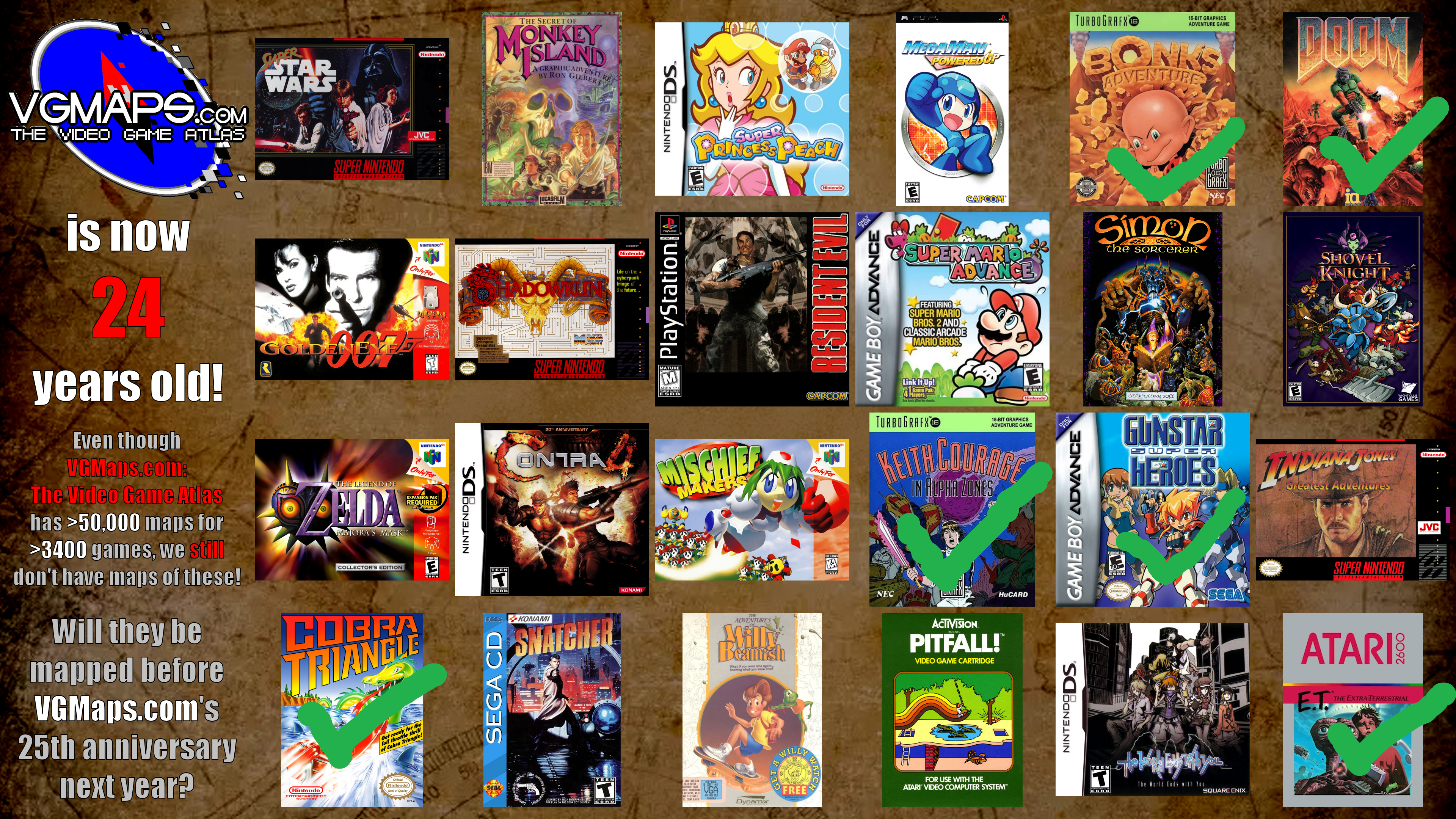
That's now six games in just under six months, still averaging one a month! What will be next?
Thanks as always, TimbreWulf!
Nice to see the mascot for that platform get his first game fully mapped! In Japan, Bonk's name is "PC Genjin", which sounds like "PC Engine", the Japanese name for the TurboGrafx 16. The PC Engine's 39th anniversary was yesterday, actually... (Also today in Bonk's Adventure news, George s submitted the tenth map for Bonk's Adventure: Arcade Version.)
Along with Keith Courage In Alpha Zones (which TimbreWulf also mapped recently), the two TurboGrafx 16 games in my list of 24 games that were unmapped by VGMaps.com's 24th anniversary have now been mapped.
That's now six games in just under six months, still averaging one a month! What will be next?
Thanks as always, TimbreWulf!
#7
Map Requests / Re: List of unmapped NES games
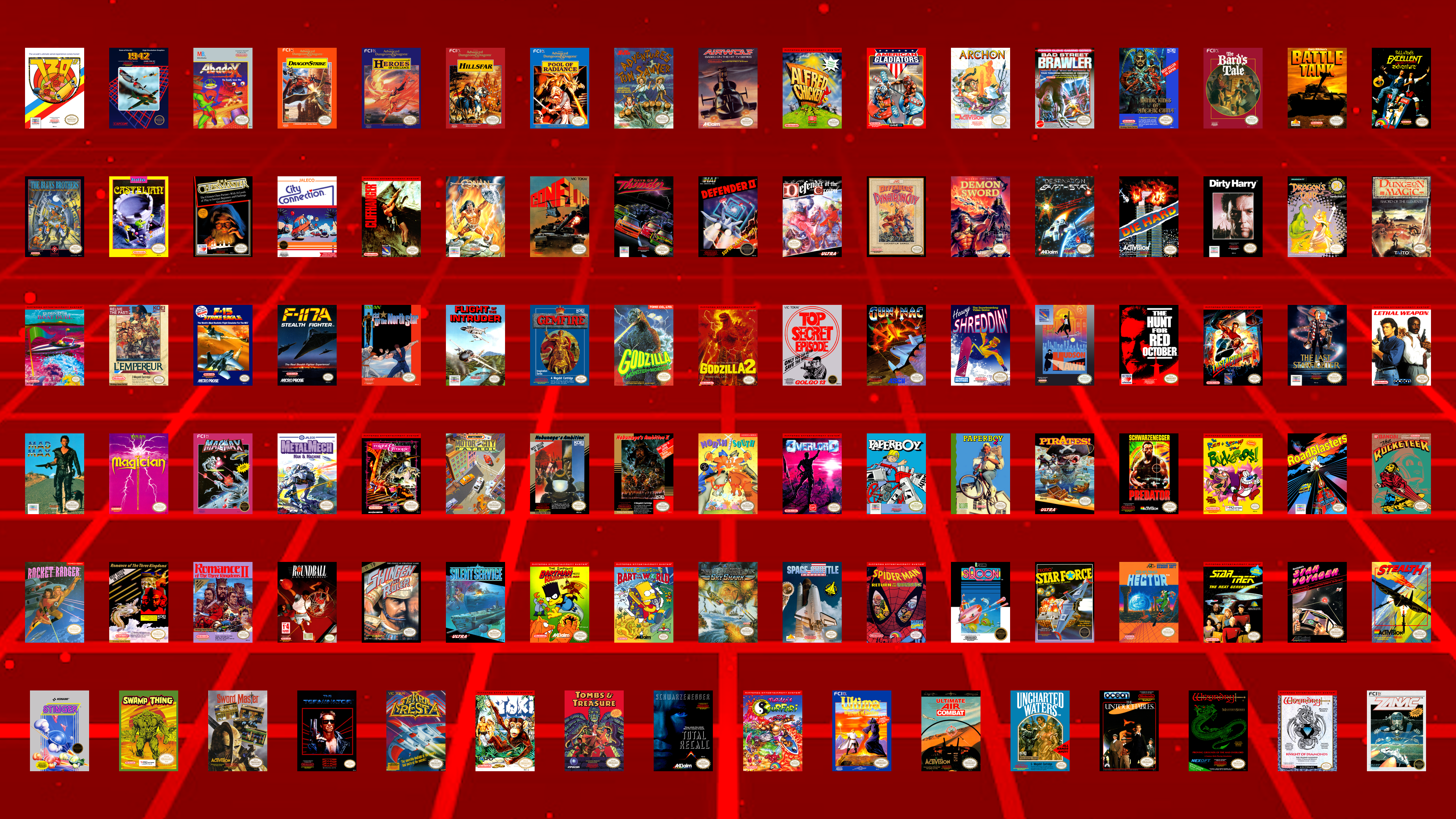
Last post by JonLeung - October 26, 2026, 06:17:44 PMWith three more games mapped, 101 games remain:
#8
Map Requests / Re: JonLeung's Requests
Last post by JonLeung - October 24, 2026, 10:56:11 AMTimbreWulf hitting up another request with the DOS game, The Amazing Spider-Man!
This is another one that I have personal memories of playing on a cousin's computer back in 1993 when our immediate family stayed at our uncle's in Ontario.
A memorable thing about this platforming game is Spider-Man's health meter, which is represented as a full-body image of him that turns grey on his name, then skeletal from his toes up to his scalp, as he takes damage.
-Spider-Man'sSkeletonHealthMeter.png)
Still probably more of a personal request than anything, but regardless, if this is considered a classic by anyone else, then it's good that it's mapped!
Thanks again, TimbreWulf!
(Though I didn't personally request it, I could also mention that another Marvel game on DOS by Paragon that was mapped by TimbreWulf this week is X-Men: Madness In Murderworld!
From what I've seen of it, it actually reminds me of another request of mine, Teenage Mutant Ninja Turtles: Manhattan Missions (also DOS, not to be confused with The Manhattan Project). Hope that gets mapped eventually too!)
This is another one that I have personal memories of playing on a cousin's computer back in 1993 when our immediate family stayed at our uncle's in Ontario.
A memorable thing about this platforming game is Spider-Man's health meter, which is represented as a full-body image of him that turns grey on his name, then skeletal from his toes up to his scalp, as he takes damage.
Still probably more of a personal request than anything, but regardless, if this is considered a classic by anyone else, then it's good that it's mapped!
Thanks again, TimbreWulf!
(Though I didn't personally request it, I could also mention that another Marvel game on DOS by Paragon that was mapped by TimbreWulf this week is X-Men: Madness In Murderworld!
From what I've seen of it, it actually reminds me of another request of mine, Teenage Mutant Ninja Turtles: Manhattan Missions (also DOS, not to be confused with The Manhattan Project). Hope that gets mapped eventually too!)
#9
Mapping Tips/Guides / Re: What map-making feature wo...
Last post by ReyVGM - October 23, 2026, 11:55:01 AMQuote from: mechaskrom on October 21, 2026, 10:33:52 AMProbably depends on how much functionality the emulator exposes in its scripting API. With enough functionality you could probably write most tools, like a debugger, in scripts if you wanted too.
You can do a lot of crazy stuff with emulator scripting and that's why I love it
Best Scripts for Nintendo NES Emulator FCEUX!
I think it's best if you post this in SuperSNES9X's github so you can interact with the author directly.
He's working on adding LUA right now, but it's best if you post exactly how it should work for people like you.
https://github.com/shanytc/snes9x/issues
#10
Mapping Tips/Guides / Re: What map-making feature wo...
Last post by mechaskrom - October 21, 2026, 10:33:52 AMQuote from: ReyVGM on October 17, 2026, 11:38:46 AMI'll add it to the requests, but it can be a bit complicated to grasp especially since none of us use those tools. Could you make a short video showing how it works and how you want that canvas thing to work? Although, it feels like this is getting a bit to close to image-editor territory.There are already quite a lot of guides and videos for emulator scripting. Some examples:
How to Write Lua Scripts for Video Games with the BizHawk Emulator
Bizhawk: Intro to Lua Scripting
CPS2/3 Romhacking: The basics of LUA
Scripting is basically an interface (API) the emulator provides that makes it possible to programmatically interact with the emulator and the emulated game. Lua is commonly used as the programming language in these scripts.
The in memory canvas thing would only need these four script functions for my use cases:
canvas = create(width, height) //New canvas with specified dimensions in pixels.
canvas.clear(color) //Clear whole canvas with specified color.
canvas.copyFromScreen(screenX, screenY, width, height, canvasX, canvasY) //Copy rectangular part of screen to canvas.
canvas.saveToFile(filepath) //Save canvas as a PNG-file.
The canvas is just a 2D array of RGB pixels. A big screenshot made up of many normal screenshots you could say. This is where the screenshots are stitched together into a map.
So it's not really an image editor. However you probably want/need some basic graphic functions in the script API so you can display text and other things. I often make scripts that show info about tilemaps, sprites and hidden items in the emulator's screen (script overlay) for example. A canvas window is useful for displaying more complicated stuff. Like this script for SimCity that displays the whole city in a canvas:
SimCity SNES map viewer script
Quote from: ReyVGM on October 17, 2026, 11:38:46 AMQuestion, if SuperSNES9x adds LUA support, is there a script you can use or does the emu author have to write its own script?Users write the scripts (they are just txt-files the emulator can open). You can probably even get an AI to help write one for you today. There exists many scripts, but unfortunately they are generally not compatible between different emulators. You often have to rewrite them a bit to get them working in another emulator.
Quote from: ReyVGM on October 17, 2026, 11:38:46 AMThere is a debugger in the works and once that's added, scripting can also be added.As SuperSNES9X is a fork of Snes9X, maybe it's possible to copy the lua scripting implementation from Snes9X Rerecording (snes9x rr)?
https://github.com/gocha/snes9x-rr
Quote from: ReyVGM on October 17, 2026, 11:38:46 AMI see you've written tools too. Can't you write your own tool and add it to SS9X once scripting is available? That way you can make the tool exactly how you (and other mappers) would like it.Probably depends on how much functionality the emulator exposes in its scripting API. With enough functionality you could probably write most tools, like a debugger, in scripts if you wanted too.
You can do a lot of crazy stuff with emulator scripting and that's why I love it
. Like give Mega Man laser eyes or Mario a jetpack:Best Scripts for Nintendo NES Emulator FCEUX!