- Welcome to VGMaps.

Recent posts
#1
Map Requests / Re: List of unmapped NES games
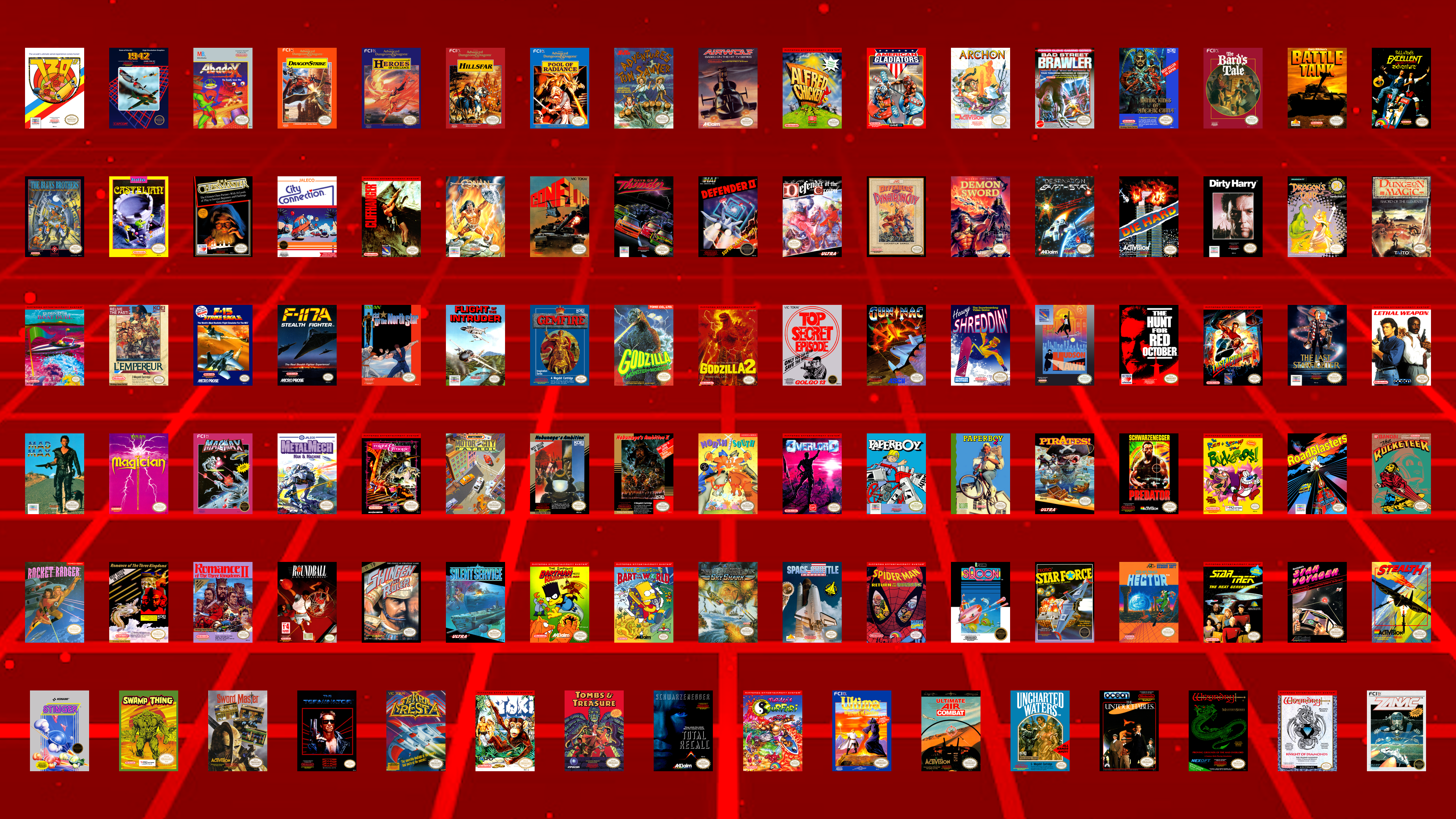
Last post by JonLeung - Today at 06:17:44 PMWith three more games mapped, 101 games remain:
#2
Map Requests / Re: JonLeung's Requests
Last post by JonLeung - October 24, 2026, 10:56:11 AMTimbreWulf hitting up another request with the DOS game, The Amazing Spider-Man!
This is another one that I have personal memories of playing on a cousin's computer back in 1993 when our immediate family stayed at our uncle's in Ontario.
A memorable thing about this platforming game is Spider-Man's health meter, which is represented as a full-body image of him that turns grey on his name, then skeletal from his toes up to his scalp, as he takes damage.
-Spider-Man'sSkeletonHealthMeter.png)
Still probably more of a personal request than anything, but regardless, if this is considered a classic by anyone else, then it's good that it's mapped!
Thanks again, TimbreWulf!
(Though I didn't personally request it, I could also mention that another Marvel game on DOS by Paragon that was mapped by TimbreWulf this week is X-Men: Madness In Murderworld!
From what I've seen of it, it actually reminds me of another request of mine, Teenage Mutant Ninja Turtles: Manhattan Missions (also DOS, not to be confused with The Manhattan Project). Hope that gets mapped eventually too!)
This is another one that I have personal memories of playing on a cousin's computer back in 1993 when our immediate family stayed at our uncle's in Ontario.
A memorable thing about this platforming game is Spider-Man's health meter, which is represented as a full-body image of him that turns grey on his name, then skeletal from his toes up to his scalp, as he takes damage.
Still probably more of a personal request than anything, but regardless, if this is considered a classic by anyone else, then it's good that it's mapped!
Thanks again, TimbreWulf!
(Though I didn't personally request it, I could also mention that another Marvel game on DOS by Paragon that was mapped by TimbreWulf this week is X-Men: Madness In Murderworld!
From what I've seen of it, it actually reminds me of another request of mine, Teenage Mutant Ninja Turtles: Manhattan Missions (also DOS, not to be confused with The Manhattan Project). Hope that gets mapped eventually too!)
#3
Mapping Tips/Guides / Re: What map-making feature wo...
Last post by ReyVGM - October 23, 2026, 11:55:01 AMQuote from: mechaskrom on October 21, 2026, 10:33:52 AMProbably depends on how much functionality the emulator exposes in its scripting API. With enough functionality you could probably write most tools, like a debugger, in scripts if you wanted too.
You can do a lot of crazy stuff with emulator scripting and that's why I love it. Like give Mega Man laser eyes or Mario a jetpack:
Best Scripts for Nintendo NES Emulator FCEUX!
I think it's best if you post this in SuperSNES9X's github so you can interact with the author directly.
He's working on adding LUA right now, but it's best if you post exactly how it should work for people like you.
https://github.com/shanytc/snes9x/issues
#4
Mapping Tips/Guides / Re: What map-making feature wo...
Last post by mechaskrom - October 21, 2026, 10:33:52 AMQuote from: ReyVGM on October 17, 2026, 11:38:46 AMI'll add it to the requests, but it can be a bit complicated to grasp especially since none of us use those tools. Could you make a short video showing how it works and how you want that canvas thing to work? Although, it feels like this is getting a bit to close to image-editor territory.There are already quite a lot of guides and videos for emulator scripting. Some examples:
How to Write Lua Scripts for Video Games with the BizHawk Emulator
Bizhawk: Intro to Lua Scripting
CPS2/3 Romhacking: The basics of LUA
Scripting is basically an interface (API) the emulator provides that makes it possible to programmatically interact with the emulator and the emulated game. Lua is commonly used as the programming language in these scripts.
The in memory canvas thing would only need these four script functions for my use cases:
canvas = create(width, height) //New canvas with specified dimensions in pixels.
canvas.clear(color) //Clear whole canvas with specified color.
canvas.copyFromScreen(screenX, screenY, width, height, canvasX, canvasY) //Copy rectangular part of screen to canvas.
canvas.saveToFile(filepath) //Save canvas as a PNG-file.
The canvas is just a 2D array of RGB pixels. A big screenshot made up of many normal screenshots you could say. This is where the screenshots are stitched together into a map.
So it's not really an image editor. However you probably want/need some basic graphic functions in the script API so you can display text and other things. I often make scripts that show info about tilemaps, sprites and hidden items in the emulator's screen (script overlay) for example. A canvas window is useful for displaying more complicated stuff. Like this script for SimCity that displays the whole city in a canvas:
SimCity SNES map viewer script
Quote from: ReyVGM on October 17, 2026, 11:38:46 AMQuestion, if SuperSNES9x adds LUA support, is there a script you can use or does the emu author have to write its own script?Users write the scripts (they are just txt-files the emulator can open). You can probably even get an AI to help write one for you today. There exists many scripts, but unfortunately they are generally not compatible between different emulators. You often have to rewrite them a bit to get them working in another emulator.
Quote from: ReyVGM on October 17, 2026, 11:38:46 AMThere is a debugger in the works and once that's added, scripting can also be added.As SuperSNES9X is a fork of Snes9X, maybe it's possible to copy the lua scripting implementation from Snes9X Rerecording (snes9x rr)?
https://github.com/gocha/snes9x-rr
Quote from: ReyVGM on October 17, 2026, 11:38:46 AMI see you've written tools too. Can't you write your own tool and add it to SS9X once scripting is available? That way you can make the tool exactly how you (and other mappers) would like it.Probably depends on how much functionality the emulator exposes in its scripting API. With enough functionality you could probably write most tools, like a debugger, in scripts if you wanted too.
You can do a lot of crazy stuff with emulator scripting and that's why I love it
. Like give Mega Man laser eyes or Mario a jetpack:Best Scripts for Nintendo NES Emulator FCEUX!
#5
Gaming / Anyone Tried and Played ANTONB...
Last post by Cyartog959 - October 21, 2026, 07:56:56 AMI tell you, that game, ANTONBLAST, is really good to enjoy! It is a brilliant one from Summitsphere, at that!
It features a literally red-colored demolition expert named Dynamite Anton, or just Anton Ball, and his green-colored partner, Dynamite Annie, or Annie Bell, on a frantic, destruction-filled adventure to retrieve back a collection of Spirits, snatched away by the mole armies from the game's take on Big Bad Red One(if you know what I mean...) after finding out Anton's redder than him and enacts a plot to siphon his own flesh tone to be the reddest being in the whole world. When Anton gets enraged from the theft, he vows to find out the lowlife behind it and blast said being into teeny, tiny, little pieces!
Of course, Annie, having only a fond reason for a chance to be destructive of her own volition, joins in with him.
They both featured in Antonball, a mix of a rather unique take of a Breakout clone and a platformer at once, and its a really interesting game, too, but that's not the point.
The game features a great abundance of platforming reminiscent to that of "Wario Land 4", and it really fills that kind of void Nintendo left behind since "Wario Land: Shake It!", though, I'll admit, that latter game did felt quite slower than the previous because of the Wii's utilization on motion controls, mostly shaking for coins.
Unlike Wario Land 4 and Shake It!, though, rather than being split up into multiple sets of small stages that feature some exploration and little backtracking, ANTONBLAST features 12 SPRAWLING stages, and I do mean that by the word. The goal remains familiar; traverse the stage to find an item needed to progress through the game, in this case, one of Anton's stolen Spirits, look for a powerful detonator and trigger its countdown, and escape to the exit, fast, fast, FAST, before time runs out!
There's additional hidden items to collect, though, and finding them requires quick thinking and clever searching, including cosmetic spray cans that change your chosen character's palettes.
The stages vary, from the very rooftops of Boiler City, their hometown, to the labyrinthine Slowroast Sewers, beneath the depths of the Concrete Jungle, which is one of the stages' actual names, mind you, and even the shopping complexes of The Mad Mall!
Of course, upon triggering the countdown on each stage, there are light flashing sign arrows that guides players the way out, so as not to get lost in the chaos. I think it is much better to have guidance, unlike Wario Land 4's lack of guiding players to the exit after triggering the bomb switch.
Upon finishing said stage, Anton and Annie get transported to Brulo's Casino as their base of operations, though Brulo had barred him from not paying his tab in months, but because of the evil presences ruining his businesses, he will lift his ban on Anton once he rids them of said presences, and acts as his supplier for purchasable items that will help them on their quest, including extending escape time.
I, alongside others, really missed that kind of gameplay blueprint after Nintendo continuously neglected the Wario Land games for constantly creating WarioWare games as their focus. There's not been a new game from that series in a long time, honestly. I don't know why Nintendo couldn't just make a new Wario Land game after Shake It! and keep at it.
Nevertheless...
Across the game, there are bosses to pummel down to pulp, and they are not pulling punches on Anton and Annie, especially the main bosses themselves! They all must be defeated before confronting the evil one himself.
The game also had a large update, called "THE END", and it adds more bosses, more difficulty modes, additional languages, optimizations, fixes, and cosmetic changes... and, adding Lime Trial stages(Its not an intentionally misnamed joke; they really are stages involving collecting actual lime slices under a tight time limit).
The only minor pity is there's not a few new sound effects, custom-made or otherwise, added as part of the update, such as the Sewer Shark having sound effects for boosting and fast movement, for one.
Should ANTONBLAST have a sequel continuing on that kind of blueprint, which I would REALLY love, I would like to see many more new stages past the amount of 12, longer and larger stages, more new bosses to fight, more permanent health upgrades past 6/7, and some stages having an exclusive escape path open to the exit, with blockades preventing backtracking and/or being accidentally dropped to a time-costing path during the countdown as a minor consequence, rather than going back to where players started upon triggering the detonation timer; a sort of a "Point A(start) to B(objective item and detonator) and C(exit)" goal in them, as it were.
Summitsphere's lead, Tony Grayson, did say we've not seen... "The BLAST of Anton" after the game did very well. And, from his comments about worrying about burnout after launching the game, I wouldn't have him worry about it. It would take much more than just launching a game after developing it to experience some burnout.
Out of many games not yet mapped, I'm quite surprised its this game.
Here's its launch trailer for the Switch to give you a clear grasp on what its about...
And, the game's update, "THE END", trailer video...
Anyone wanting to give ANTONBLAST a go, its your chance, for its already out on PC, the Switch(which was delayed slightly because of weather attacks then), and PlayStation systems! I've been enjoying it!
Be ready to enjoy the speedy, explosive carnage coming at you! You'll have... a REAL BLAST!
It features a literally red-colored demolition expert named Dynamite Anton, or just Anton Ball, and his green-colored partner, Dynamite Annie, or Annie Bell, on a frantic, destruction-filled adventure to retrieve back a collection of Spirits, snatched away by the mole armies from the game's take on Big Bad Red One(if you know what I mean...) after finding out Anton's redder than him and enacts a plot to siphon his own flesh tone to be the reddest being in the whole world. When Anton gets enraged from the theft, he vows to find out the lowlife behind it and blast said being into teeny, tiny, little pieces!
Of course, Annie, having only a fond reason for a chance to be destructive of her own volition, joins in with him.
They both featured in Antonball, a mix of a rather unique take of a Breakout clone and a platformer at once, and its a really interesting game, too, but that's not the point.
The game features a great abundance of platforming reminiscent to that of "Wario Land 4", and it really fills that kind of void Nintendo left behind since "Wario Land: Shake It!", though, I'll admit, that latter game did felt quite slower than the previous because of the Wii's utilization on motion controls, mostly shaking for coins.
Unlike Wario Land 4 and Shake It!, though, rather than being split up into multiple sets of small stages that feature some exploration and little backtracking, ANTONBLAST features 12 SPRAWLING stages, and I do mean that by the word. The goal remains familiar; traverse the stage to find an item needed to progress through the game, in this case, one of Anton's stolen Spirits, look for a powerful detonator and trigger its countdown, and escape to the exit, fast, fast, FAST, before time runs out!
There's additional hidden items to collect, though, and finding them requires quick thinking and clever searching, including cosmetic spray cans that change your chosen character's palettes.
The stages vary, from the very rooftops of Boiler City, their hometown, to the labyrinthine Slowroast Sewers, beneath the depths of the Concrete Jungle, which is one of the stages' actual names, mind you, and even the shopping complexes of The Mad Mall!
Of course, upon triggering the countdown on each stage, there are light flashing sign arrows that guides players the way out, so as not to get lost in the chaos. I think it is much better to have guidance, unlike Wario Land 4's lack of guiding players to the exit after triggering the bomb switch.
Upon finishing said stage, Anton and Annie get transported to Brulo's Casino as their base of operations, though Brulo had barred him from not paying his tab in months, but because of the evil presences ruining his businesses, he will lift his ban on Anton once he rids them of said presences, and acts as his supplier for purchasable items that will help them on their quest, including extending escape time.
I, alongside others, really missed that kind of gameplay blueprint after Nintendo continuously neglected the Wario Land games for constantly creating WarioWare games as their focus. There's not been a new game from that series in a long time, honestly. I don't know why Nintendo couldn't just make a new Wario Land game after Shake It! and keep at it.
Nevertheless...
Across the game, there are bosses to pummel down to pulp, and they are not pulling punches on Anton and Annie, especially the main bosses themselves! They all must be defeated before confronting the evil one himself.
The game also had a large update, called "THE END", and it adds more bosses, more difficulty modes, additional languages, optimizations, fixes, and cosmetic changes... and, adding Lime Trial stages(Its not an intentionally misnamed joke; they really are stages involving collecting actual lime slices under a tight time limit).
The only minor pity is there's not a few new sound effects, custom-made or otherwise, added as part of the update, such as the Sewer Shark having sound effects for boosting and fast movement, for one.
Should ANTONBLAST have a sequel continuing on that kind of blueprint, which I would REALLY love, I would like to see many more new stages past the amount of 12, longer and larger stages, more new bosses to fight, more permanent health upgrades past 6/7, and some stages having an exclusive escape path open to the exit, with blockades preventing backtracking and/or being accidentally dropped to a time-costing path during the countdown as a minor consequence, rather than going back to where players started upon triggering the detonation timer; a sort of a "Point A(start) to B(objective item and detonator) and C(exit)" goal in them, as it were.
Summitsphere's lead, Tony Grayson, did say we've not seen... "The BLAST of Anton" after the game did very well. And, from his comments about worrying about burnout after launching the game, I wouldn't have him worry about it. It would take much more than just launching a game after developing it to experience some burnout.
Out of many games not yet mapped, I'm quite surprised its this game.
Here's its launch trailer for the Switch to give you a clear grasp on what its about...
And, the game's update, "THE END", trailer video...
Anyone wanting to give ANTONBLAST a go, its your chance, for its already out on PC, the Switch(which was delayed slightly because of weather attacks then), and PlayStation systems! I've been enjoying it!
Be ready to enjoy the speedy, explosive carnage coming at you! You'll have... a REAL BLAST!
#6
Map Requests / Re: JonLeung's Requests
Last post by Cyartog959 - October 21, 2026, 06:23:39 AMQuote from: JonLeung on October 18, 2026, 01:44:00 PMQuote from: Cyartog959 on October 17, 2026, 09:43:50 PMQuote from: JonLeung on October 17, 2026, 02:51:37 PMThough, yes, you may have noticed the maps aren't 1:1. Timbrewulf and I have talked about it. But I'm still happy to have these maps as they are, maybe it'll draw more attention to Lovish. Fans of puzzly platformers should check it out! I 100%ed it earlier this year, and it was quite satisfying to do so, especially the timed challenges. I got it for free through a giveaway on social media, but I'd happily have paid for it, considering how much fun I had playing it.Well, yes, I noticed they're not 1:1, mainly because the game's engine is made with Clickteam Fusion. I'm not disappointed. I'm sure Timbrewulf will revise the maps to be 1:1 later with the select, proper tools suited for ripping Clickteam made game maps.
I don't think that Clickteam Fusion has much to do with it... At least not specifically...
By playing the game windowed, with the options of Window Size = x1 and Soft Pixels = OFF, the pixels come out 1:1 and clean.
Or when playing the game fullscreen, set your display to 1280 x 768, and set the options to Window Size = Fullscreen 1 and Soft Pixels = OFF, then do a pixel resize to 25% (since 1280 x 768 is four times larger in each dimension to 320 x 192, the original resolution).
I think it's important to consider checking the options to games with the retro aesthetic. Mapping seems more "right" with 1:1, unfiltered graphics.
Anyways, most of the Lovish maps have now been corrected to be 1:1, so thanks again to TimbreWulf, especially for putting up with my concerns.
OH... That's why the previous batch of maps turned out like that before they got revised. Guess they looked less crisp with the Soft Pixels option on and graphics filters on. I tried guessing a few reasons on how and why that happened.
Well, at least, anyone willing to do maps can look up on necessary instructions here to have them 1:1 and unfiltered, for later point of reference.
#7
Map Requests / Re: List of unmapped NES games
Last post by JonLeung - October 18, 2026, 04:44:14 PMHappy 41st birthday to the NES!
Thought I'd take this oportunity to make a collage of the boxes of the 104 officially-licensed North American NES games that we still don't have maps for...
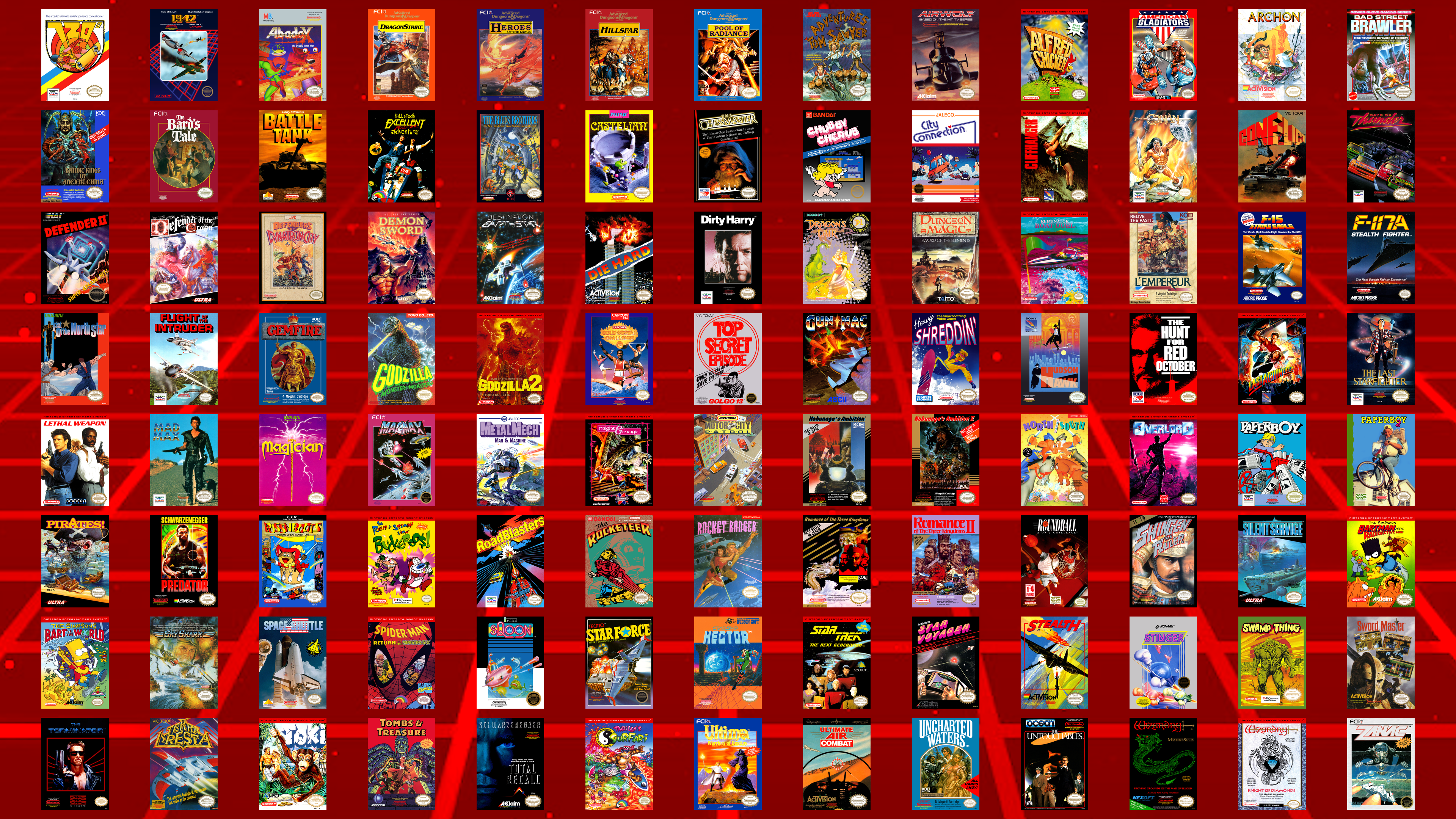
Interestingly, there are two Mel Gibson movie games next to each other alphabetically - Lethal Weapon and Mad Max.
There are four Schwarzenegger movie games - Last Action Hero, Predator, The Terminator, and Total Recall. (I don't think Conan counts...)
Are there any games here that are surprising that they haven't been mapped yet?
Thought I'd take this oportunity to make a collage of the boxes of the 104 officially-licensed North American NES games that we still don't have maps for...
Interestingly, there are two Mel Gibson movie games next to each other alphabetically - Lethal Weapon and Mad Max.
There are four Schwarzenegger movie games - Last Action Hero, Predator, The Terminator, and Total Recall. (I don't think Conan counts...)
Are there any games here that are surprising that they haven't been mapped yet?
#8
Map Requests / Re: JonLeung's Requests
Last post by JonLeung - October 18, 2026, 01:44:00 PMQuote from: Cyartog959 on October 17, 2026, 09:43:50 PMQuote from: JonLeung on October 17, 2026, 02:51:37 PMThough, yes, you may have noticed the maps aren't 1:1. Timbrewulf and I have talked about it. But I'm still happy to have these maps as they are, maybe it'll draw more attention to Lovish. Fans of puzzly platformers should check it out! I 100%ed it earlier this year, and it was quite satisfying to do so, especially the timed challenges. I got it for free through a giveaway on social media, but I'd happily have paid for it, considering how much fun I had playing it.Well, yes, I noticed they're not 1:1, mainly because the game's engine is made with Clickteam Fusion. I'm not disappointed. I'm sure Timbrewulf will revise the maps to be 1:1 later with the select, proper tools suited for ripping Clickteam made game maps.
I don't think that Clickteam Fusion has much to do with it... At least not specifically...
By playing the game windowed, with the options of Window Size = x1 and Soft Pixels = OFF, the pixels come out 1:1 and clean.
Or when playing the game fullscreen, set your display to 1280 x 768, and set the options to Window Size = Fullscreen 1 and Soft Pixels = OFF, then do a pixel resize to 25% (since 1280 x 768 is four times larger in each dimension to 320 x 192, the original resolution).
I think it's important to consider checking the options to games with the retro aesthetic. Mapping seems more "right" with 1:1, unfiltered graphics.
Anyways, most of the Lovish maps have now been corrected to be 1:1, so thanks again to TimbreWulf, especially for putting up with my concerns.
#9
Map Requests / Re: JonLeung's Requests
Last post by Cyartog959 - October 17, 2026, 09:43:50 PMQuote from: JonLeung on October 17, 2026, 02:51:37 PMProbably the newest game on my list has been mapped by TimbreWulf! It's the indie game, Lovish!
It's a retro-styled puzzlish platformer, with most stages being a single screen, where you try to unlock the exit and then make your way to it. It's got some fun references to other games, like in the fun scenes in between each challenge. I'm not so demanding as to ask for all those random events to all be mapped, LOL.
Well, its rather neat to see such a game mapped, even though its all made into random chances of different events, but the callbacks to past games are rather a nice touch. I'll admit, it is rather confusing to me upon seeing its trailer.
QuoteThough, yes, you may have noticed the maps aren't 1:1. Timbrewulf and I have talked about it. But I'm still happy to have these maps as they are, maybe it'll draw more attention to Lovish. Fans of puzzly platformers should check it out! I 100%ed it earlier this year, and it was quite satisfying to do so, especially the timed challenges. I got it for free through a giveaway on social media, but I'd happily have paid for it, considering how much fun I had playing it.
Well, yes, I noticed they're not 1:1, mainly because the game's engine is made with Clickteam Fusion. I'm not disappointed. I'm sure Timbrewulf will revise the maps to be 1:1 later with the select, proper tools suited for ripping Clickteam made game maps.
Good for you on having that game for free and finishing it 100%, Jon.
#10
Map Requests / Re: JonLeung's Requests
Last post by JonLeung - October 17, 2026, 02:51:37 PMProbably the newest game on my list has been mapped by TimbreWulf! It's the indie game, Lovish!
It's a retro-styled puzzlish platformer, with most stages being a single screen, where you try to unlock the exit and then make your way to it. It's got some fun references to other games, like in the fun scenes in between each challenge. I'm not so demanding as to ask for all those random events to all be mapped, LOL.
Though, yes, you may have noticed the maps aren't 1:1. Timbrewulf and I have talked about it. But I'm still happy to have these maps as they are, maybe it'll draw more attention to Lovish. Fans of puzzly platformers should check it out! I 100%ed it earlier this year, and it was quite satisfying to do so, especially the timed challenges. I got it for free through a giveaway on social media, but I'd happily have paid for it, considering how much fun I had playing it.
The fourth stage, the Kingdom Of Mirrors, has this rocking music. The official YouTube video of this music track only has 178 views as of now - probably half of those are mine, LOL, as I've come back to this several times this year when I play YouTube music in the background while I work. This game is seriously underrated, and more gamers should check it out.
It's a retro-styled puzzlish platformer, with most stages being a single screen, where you try to unlock the exit and then make your way to it. It's got some fun references to other games, like in the fun scenes in between each challenge. I'm not so demanding as to ask for all those random events to all be mapped, LOL.
Though, yes, you may have noticed the maps aren't 1:1. Timbrewulf and I have talked about it. But I'm still happy to have these maps as they are, maybe it'll draw more attention to Lovish. Fans of puzzly platformers should check it out! I 100%ed it earlier this year, and it was quite satisfying to do so, especially the timed challenges. I got it for free through a giveaway on social media, but I'd happily have paid for it, considering how much fun I had playing it.
The fourth stage, the Kingdom Of Mirrors, has this rocking music. The official YouTube video of this music track only has 178 views as of now - probably half of those are mine, LOL, as I've come back to this several times this year when I play YouTube music in the background while I work. This game is seriously underrated, and more gamers should check it out.